You can copy any Active or Offline job by clicking on the three-dot menu pointed out below and selecting 'Copy Job'.
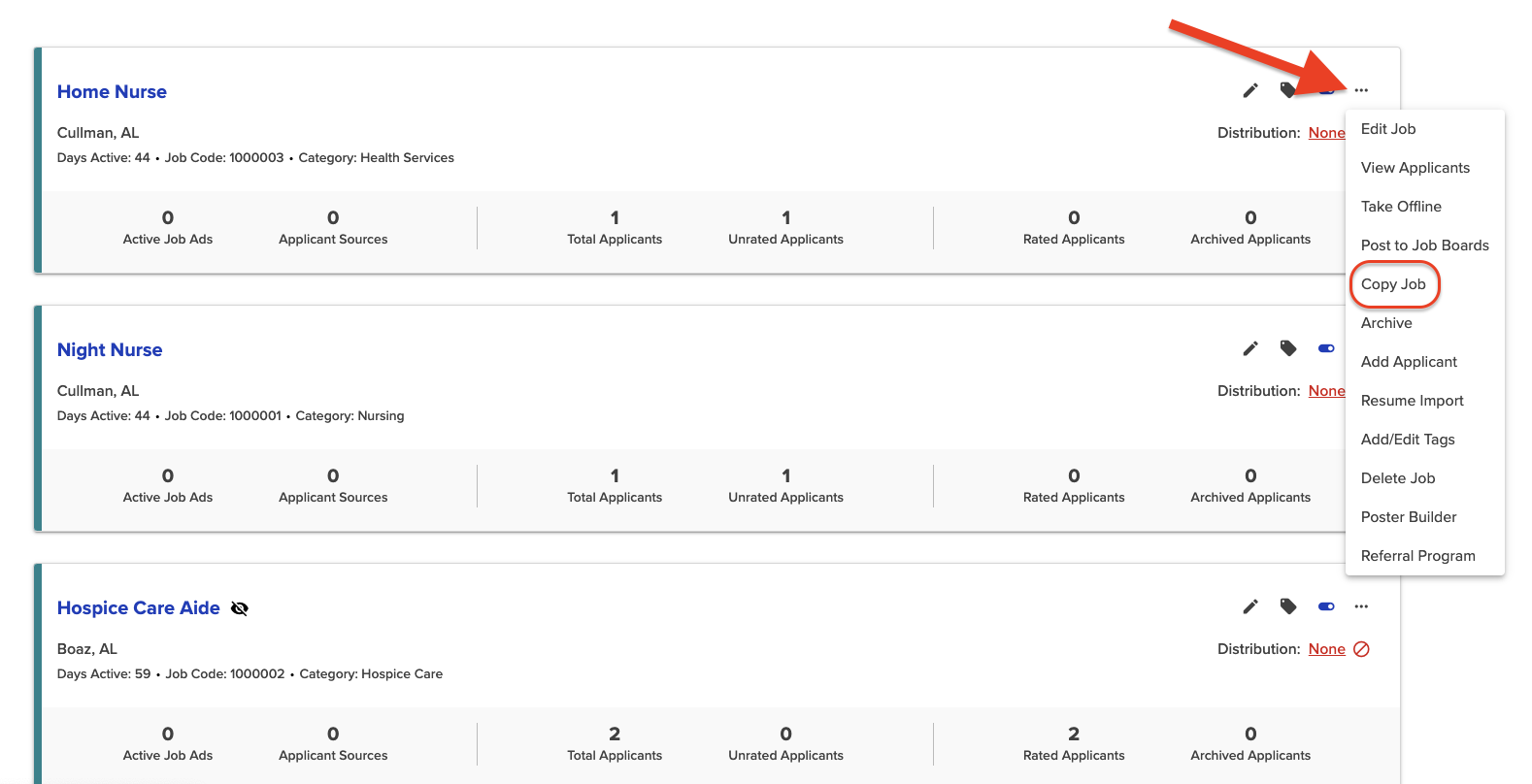
This will create a copy of the job and open it in the Edit/Create Job page, where you can edit the details and save the job.
This Knowledgebase is licensed by the owner of the relevant web domain and uses HTTP cookies for essential functionality and to improve your experience. Click here for more information about the cookies used. Please refer to this site’s Cookie Policy for more information.
We use cookies to give you a better experience in Applicant Tracking Software
You can learn more about what kind of cookies we use, why, and how from our Privacy Policy. Because we respect your right to privacy, you can choose not to allow some types of cookies. Click on the different category headings in our cookie banner to change our default settings. However, blocking some types of cookies may impact your experience of the site and the services we are able to offer. For more details, check out our Privacy Policy link below.
View Privacy PolicyThese cookies are necessary for the website to function and cannot be switched off in our systems, but do not store any person information. They are usually set in response to your actions that triggers a request for services, such as setting your privacy preferences, logging in or filling forms. You can change your browser settings to alert you about these cookies, but some parts of the Website may not work.
View Cookies
| Name | Host | Duration | Description |
|---|---|---|---|
| _fw_crm_v | hiringthing.freshdesk.com | 1 year | Freshchat/Freshworks cookie (Used to track Visitor/User identity and chat sessions performed by the User). |
| _x_w | hiringthing.freshdesk.com | Session | Contains the shard ID at which the account runs on. |
| _x_m | hiringthing.freshdesk.com | Session | Contains the state of the shard. |
| _helpkit_session | hiringthing.freshdesk.com | Session | Your secret key for verifying cookie session data integrity. If you change this key, all old sessions will become invalid! |
| helpdesk_node_session | hiringthing.freshdesk.com | Session | An encrypted hash that stores the secret key and id of the login attempt. |
| user_credentials | hiringthing.freshdesk.com | 2 months | Used for user authentication. |
| wf_order | hiringthing.freshdesk.com | Session | Used to check in which the order the tickets are filtered for custom ticket filters eg: due_by, agent_responded_at, requester_responded_at, etc. |
| wf_order_type | hiringthing.freshdesk.com | Session | Used to check if the order is ascending or descending for custom ticket filters. |
| wf_filter | hiringthing.freshdesk.com | Session | Denotes which filter is applied for the tickets list. |
Modified on: Tue, 14 Jul, 2026 at 2:12 PM
You can copy any Active or Offline job by clicking on the three-dot menu pointed out below and selecting 'Copy Job'.
This will create a copy of the job and open it in the Edit/Create Job page, where you can edit the details and save the job.
Did you find it helpful? Yes No
Send feedback