
Posting to LinkedIn's free job board used to mean heading over to the Job Board page and taking action on every single job, one at a time. Not anymore.
Now, as long as your LinkedIn Company Page is connected under Company Information, your jobs are automatically eligible to post there at no cost. No extra clicks required per job.
Why You Need a Verified LinkedIn Company Page
To post organically to LinkedIn, you'll need a verified LinkedIn Company Page URL connected to your account. Think of it as LinkedIn wanting to check ID at the door before it lets your jobs in.
How to Connect Your LinkedIn Company Page
Here's how to get set up:
- From the Main Menu (☰), go to Account > Account Details > Company Information.
- Find the Connect to LinkedIn field and enter your LinkedIn Company Page URL.
- Click Save.
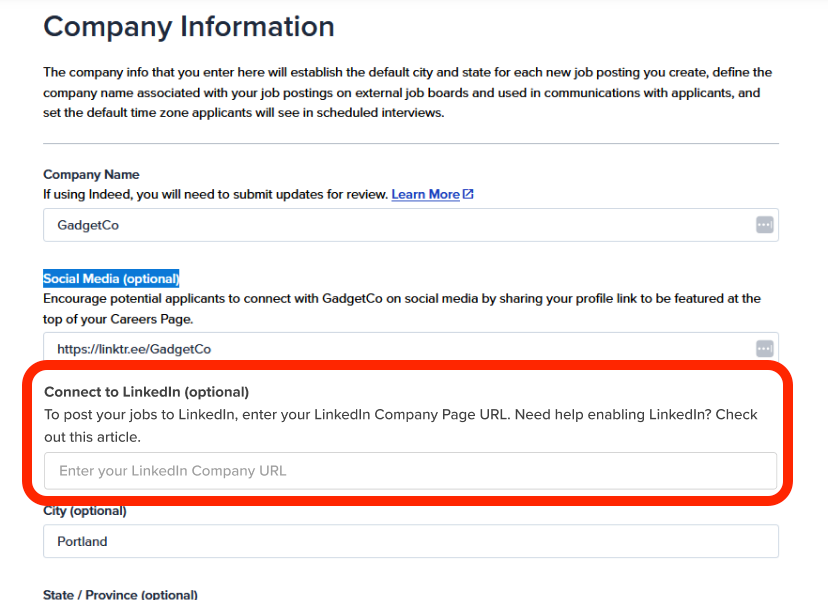
A few things worth knowing before you get started:
- Check your permissions. You'll need the Manage Account Details permission to see this page. If it's not showing up for you, ask your account admin to grant that permission or update the field on your behalf.
- No LinkedIn Company Page yet? You'll need to create one first. Once it's live, grab the URL and drop it into the field above.
- Already filled in? If your account had an active LinkedIn campaign, we may have pre-populated this field to make the transition smoother. Either way, take a moment to double-check it's accurate, since this URL determines where your jobs get posted going forward.
Managing LinkedIn for Multi-Site Accounts
By default, every site under your account uses your parent company's LinkedIn Company Page. If a specific site needs to post under a different LinkedIn page, here's how to set that up:
- From the Main Menu (☰), go to Account > Site Management.
- Select the site that needs its own connection.
- Click on the "Edit details" button
- Enter that site's unique LinkedIn Company Page URL.
- Don't forget to Save!
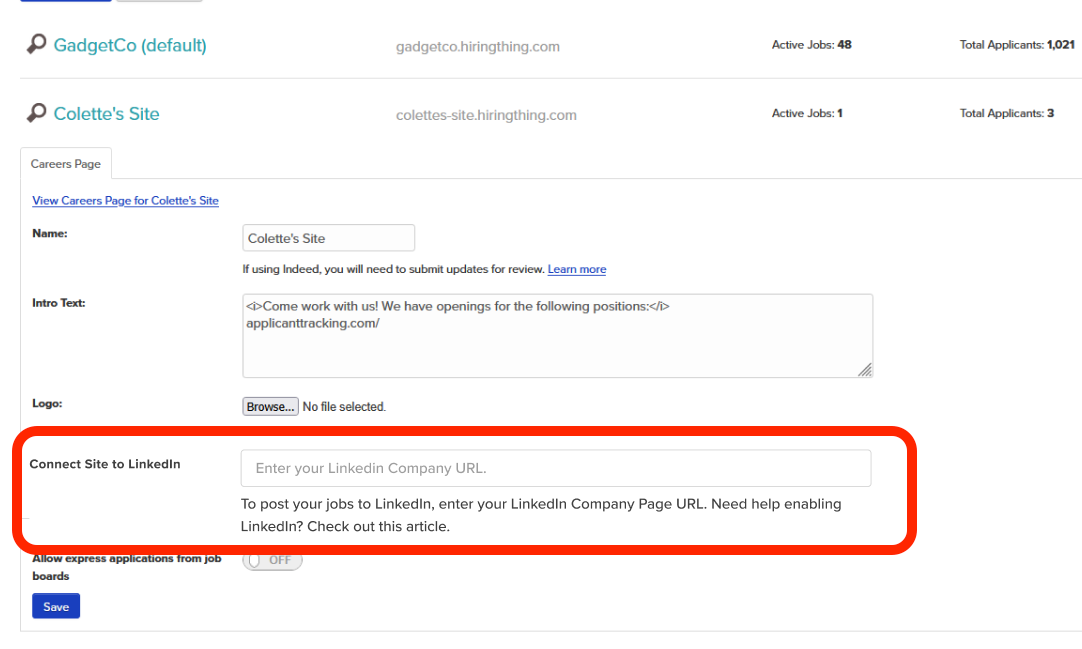
Opting Out of LinkedIn Posting
Changed your mind, or just want more control over what gets posted where? You have options:
- To stop all jobs from posting to LinkedIn: Remove the LinkedIn URL from your Company Information page.
- To exclude one specific job only: Add
#LI-DNIto that job's description, and LinkedIn's systems will skip it.
Still have questions about connecting your LinkedIn Company Page, or anything else covered here? Our support team is always happy to help you get set up correctly, so don't hesitate to reach out.